Supported Formats
FieldTwin Design is able to ingest data from a multitude of input sources such as various file formats and online data/web services. This is an overview over the various formats we support:
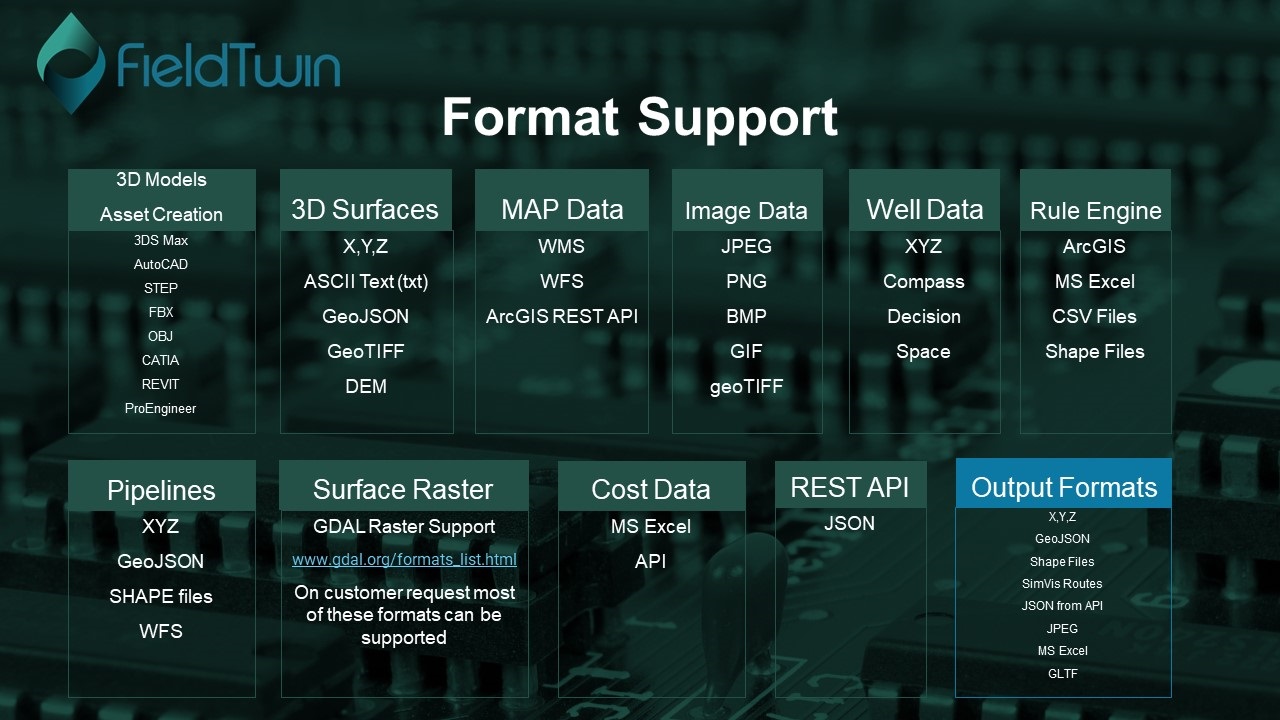
3D Models
To allow for real time collaborative field design using modern cloud and browser based technology allowing you access from anywhere at anytime we offer a Generic Library of 3D models that are optimized for online streaming. The format used is:
.gltf
You can read more about the standard here:
To create your own private asset libraries and have them available to your instance, please contact us for more information as we support most 3D Engineering formats in the 3D model optimisation, conversion and asset publishing process such as 3DS Max, AutoCAD, REVIT, SolidWorks, and STEP/FBX/ OBJ files.
3D Models Viewing
For FieldTwin Asset Viewing we support the following:
3DS, FBX, OBJ, STEP, STP, GLTF, GLB, STL, PLY, and DAE
3D Surfaces
This allows you to add Bathymetry and/or Survey data to your Field layout in GeoTiff or X,Y,Z (point-cloud) format. You can add multiple Bathymetry/Surveys to a sub-project. FieldTwin will then height- or depth-sample if you will each Bathymetry layer individually, and where there is no Bathymetry data the default “Sea Level” value from the Project settings will be used.
- X,Y,Z
- ASCII Text (txt)
- GeoJSON
- GeoTIFF
- DEM
- DSM
- PLY
- PTS
Point Clouds
FieldTwin supports the following point cloud formats:
- XYZ
- LAS, LAZ,
2D Images
We support imagery to be added to your field layout as layers. The image formates supported are:
JPEG, JFIF, PNG, PJP, BMP, HEIC, GIF, XBM, WEBP, TIFF, ICO, and SVG
For more information see Picture
Media
We support the following video formats:
MP4, WEBM, OGG, MOV, and AVI
Map Data
We support the following:
WMS, WFS, and ArcGIS REST API
Well trajectories
We support the most common well data formats from applications such as Compass, DecisionSpace etc. Typically well trajectories are ingested from XYZ text files, or through the API.
FieldTwin also supports the SiteCom REST API for Well Trajectory ingestation. REad more here SiteCom
For more information see Well from File
Rules Engine
The Rules Engine allows you to create a set of rules with conditions when you import data from either a file such as a Shape, CSV or a MS Excel file. Or you can connect directly to an ArcGIS Map server. The rules you create based on the input data will trigger corresponding FieldTwin Actions.
FieldTwin can then auto-create a field layout including 3D assets and connections using your set of import rules. You can also import and export your rule set to use it in multiple projects. A typical use case could be to auto create brownfield assets or connections for tie in, slot in considerations etc.
For more information see Rules Engine
Pipelines
If you want to ingest pipeline data this can be done by importing a connection profile in x,y,z ASCII format.
For more information see Support for Text and x,y,z files
You can also import connections or pipelines from files as follows:
GeoJSON
For more information see Support for GeoJSON files
Shape file import
For more information see Support for SHP files import
Import Profile from WFS
For more information see Import Profile From WFS
Surface Raster formats
Read more about the raster formats we handle here :
www.gdal.org/formats_list.html
Cost Data
In addition to the built in cost functionality in FieldTwin we also support the following:
MS Excel, CSV
In addition we also support Cost Assist by Rystad Energy. Read more about it here Cost Assist
Seismic
FieldTwin allows you to view SGY, and SEGY data.
Documents
FieldTwin allows you to view the following document formats directly:
- Adobe PDF
- MS Excel (XLS, XLSX, XLSB, XLSM. and CSV)
Output Formats
FieldTwin support export of the following data formats:
- XYZ ASCII Text
- GeoJSON, JSON
- SHP, SVG
- CAD scripts
- SimVis
- JPEG
- MS Excel
- GLTF
- WEBM, MP4
For more information see Export Menu